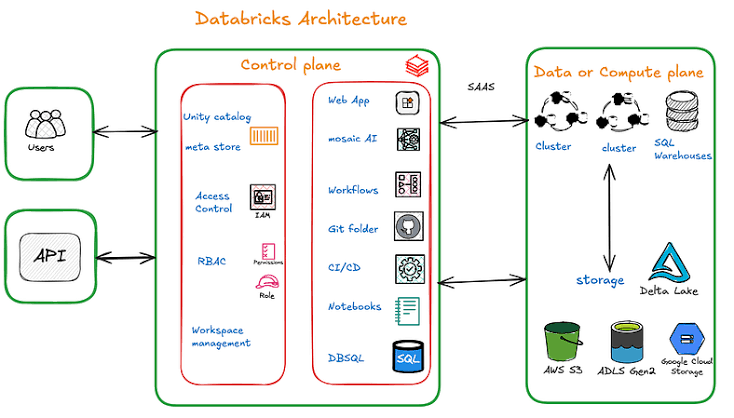
Databricks Architecture
Databricks at it's core follows a two-layer architecture:
- Control Plane (Managed by Databricks)
- Compute Plane (Customer's Cloud or Serverless)
Control Plane
The Control Plane runs as a SaaS service fully managed by Databricks. It handles:
| Component | Purpose |
|---|---|
| Web Application / Workspace | UI for managing notebooks, clusters, jobs, and assets |
| Unity Catalog & Metastore | Data governance, access control, lineage tracking; stores metadata (table structures, schemas, partitions) |
| Access Control & Security | IAM, RBAC for managing user identities and permissions |
| Workflows / Job Scheduler | Automates job execution for data pipelines |
| Mosaic AI | Suite of AI/ML tools for advanced analytics |
| Git & CI/CD Integration | Version control via Git repos; CI/CD workflows for deployment |
| Notebooks & DBSQL | Collaborative coding (Python, Scala, SQL, R); serverless SQL engine for big data queries |
Compute Plane
The Compute Plane is where actual data processing and storage happens. It comes in two flavors:
- Classic Compute: Runs inside your own cloud account (AWS VPC, Azure VNet, GCP). You manage the network and resources.
- Serverless Compute: Fully managed by Databricks with built-in security boundaries. No infrastructure management needed.
Key components in the Compute Plane
- Compute Clusters: Auto-scaling Spark clusters for ETL, analytics, and ML workloads
- SQL Warehouses: Photon-powered endpoints optimized for BI queries
- Cloud Storage: Integrates with ADLS Gen2, S3, GCS for data lake storage
Core Platform Components
| Component | What It Does |
|---|---|
| Delta Lake | Open-source storage layer, ACID transactions, schema enforcement/evolution, time travel, streaming + batch on one layer |
| Unity Catalog | Centralized governance, fine-grained access control, auditing, lineage, data privacy across all workspaces |
| Delta Live Tables (DLT) | Declarative ETL framework, build reliable pipelines in SQL or Python with built-in data quality checks and lineage |
| Databricks SQL | Run interactive SQL queries; connect to Power BI, Tableau, Looker for dashboarding and reporting. |
| MLflow | End-to-end ML lifecycle, experiment tracking, model registry, versioning, deployment |
| Workflows (Jobs) | Schedule and orchestrate ETL, ML training, and maintenance tasks with alerts, retries, and dependencies |
| Notebooks | Interactive, collaborative coding in Python, SQL, Scala, R with real-time visualizations |
| Repos | Git integration (GitHub, Azure DevOps, GitLab) for version control and CI/CD |
Medallion Architecture (Data Organization Pattern)
Databricks uses the Medallion Architecture to organize data through progressive layers of quality:
Raw Sources --> [Bronze] --> [Silver] --> [Gold] --> BI / ML / Apps
| Layer | Purpose | Example |
|---|---|---|
| Bronze | Raw ingested data (as-is from source) | Raw CSV, JSON, logs, CDC streams |
| Silver | Cleaned, validated, enriched data | Deduped records, joined tables, type-casted columns |
| Gold | Aggregated, business-ready data | KPI dashboards, summary tables, ML feature tables |
Object Hierarchy
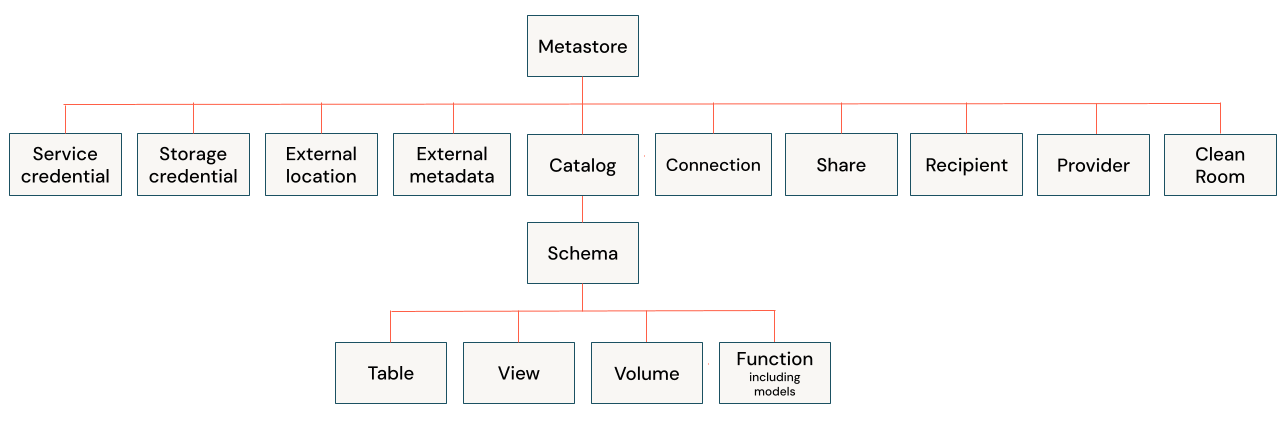
Databricks organizes resources in a clear hierarchy.
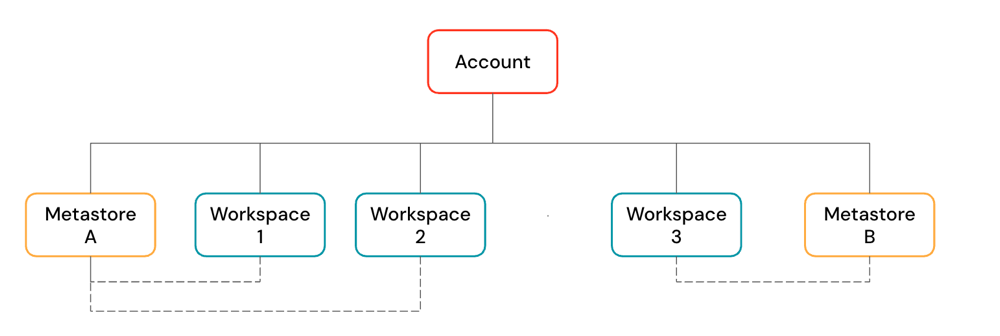
- An Account is the top-level construct for managing Databricks across your organization
- Workspaces are where users run compute workloads (ingestion, exploration, jobs, ML training)
- Unity Catalog Metastore provides centralized governance with a three-level namespace:
<catalog>.<schema>.<object>.
High-Level Architecture Diagram (Simplified)