Workspace, Notebooks & Azure Integration
Workspace
The Databricks Workspace is the central hub for accessing all Databricks objects and features. It provides a unified interface to access, create, and collaborate on notebooks, files, folders, dashboards, queries, and libraries.
Workspace Folder Types
| Folder | Description |
|---|---|
| Users | Personal workspace, private notebooks and files per user |
| Shared | Collaborative space for team projects |
| Repos | Git-integrated folders (GitHub, Azure DevOps, GitLab) |
Workspace Objects
Objects you can create and manage inside a workspace:
- Notebooks
- Files (Python scripts, JARs, etc.)
- Folders
- Dashboards & Queries
- Libraries
- Repos (Git folders)
- Experiments (MLflow)
Each object has a unique identifier for programmatic access via APIs.
Workspace Types
There are two types of workspaces:
- Classic Workspace
- Serverless Workspace
| Classic (Hybrid) Workspace | Serverless Workspace | |
|---|---|---|
| Compute | Your cloud account + optional serverless | Fully Databricks-managed |
| Storage | Workspace storage in your cloud account | Default storage (Databricks-managed) |
| Setup | You configure VPC/VNet, storage, networking | Pre-configured, zero cloud setup |
| Azure Portal Name | Hybrid Workspace | Serverless Workspace |
Classic Workspace Architecture
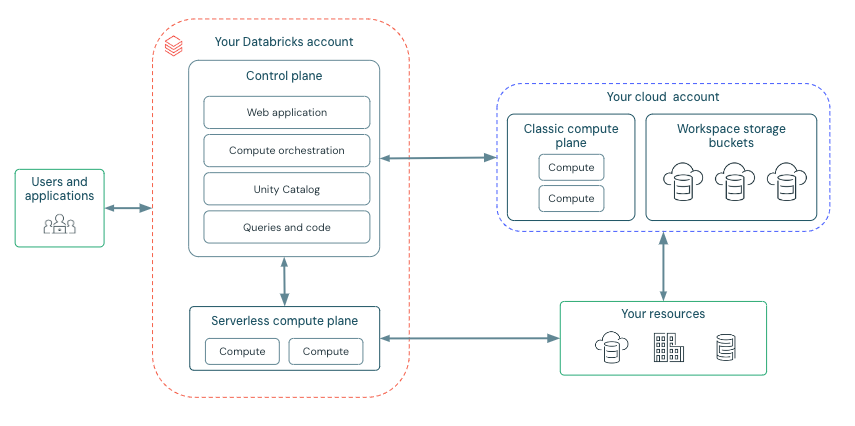
Classic Databricks workspaces have an associated workspace storage account (Azure) or workspace storage bucket (AWS) in your cloud account.
This storage contains:
- Workspace system data - notebook revisions, job run details, command results, Spark logs
- DBFS root - legacy Databricks File System for storing and accessing data
- Unity Catalog default catalog data (if applicable)
The compute resources (clusters, SQL warehouses) are deployed inside your virtual network, giving you full control and isolation.
Serverless Workspace Architecture
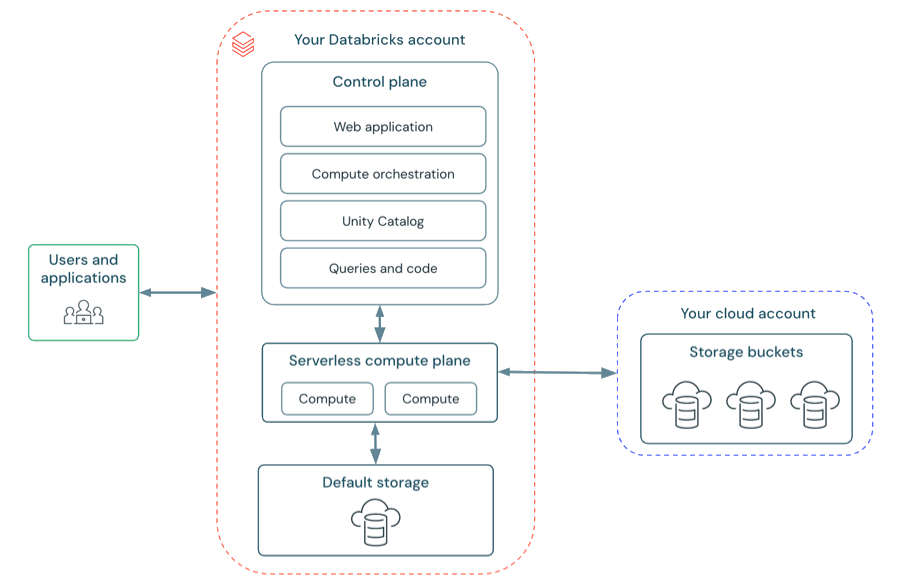
Serverless workspaces use default storage -- a fully managed object storage platform provided by Databricks. No need to configure external cloud storage or manage access credentials.
Default storage is used for:
- Internal workspace operations and control plane metadata
- Workspace-level files and artifacts
- The default catalog created automatically with the workspace
- Additional catalogs (optionally in default storage or your own cloud storage)
You can still connect to your own cloud storage account to access your data.
Note: All interactions with default storage require serverless, Unity Catalog-enabled compute. Classic compute cannot directly access default storage assets.
 `
`
Databricks Notebooks
Databricks Notebooks are interactive, cloud-based documents that combine code execution, visualization, and narrative text in a cell-based model.
Databricks support python, sql, scala, r, markdown in a single notebook
Note: Inline comments with
@usernamementions and email notifications
You can chain notebooks in two ways:
- Using
%run /path/to/the/nb, this way shares variable context, this does not return any exit values dbutils.notebook.run("path/to/other_nb", timeout_seconds=123, arguments={"key", "val"}), this run isolated execution and return exit value
Notebook Permissions
Five permission levels (available in Premium plan):
| Permission | View | Comment | Run | Edit | Manage Permissions |
|---|---|---|---|---|---|
| NO PERMISSIONS | |||||
| CAN READ | x | x | |||
| CAN RUN | x | x | x | ||
| CAN EDIT | x | x | x | x | |
| CAN MANAGE | x | x | x | x | x |
- Workspace admins get CAN MANAGE on all notebooks
- Creators automatically get CAN MANAGE on their own notebooks
- Notebooks inherit permissions from their parent folder
Compute Attachment
- Notebooks can attach to All-Purpose Clusters (interactive) or SQL Warehouses (SQL only)
- When connected to a SQL Warehouse, only
%sqlcells execute; other languages are skipped
Databricks Utilities (dbutils)
dbutils is Databricks' built-in utility library available in Python, R, and Scala notebooks. It provides modules for file management, secrets, widgets, notebook orchestration, and more.
Modules Overview
| Module | Description |
|---|---|
dbutils.fs |
File system operations on DBFS |
dbutils.secrets |
Secure secret management |
dbutils.widgets |
Interactive notebook parameterization |
dbutils.notebook |
Notebook orchestration and control flow |
dbutils.jobs |
Job-related features |
dbutils.library |
(Deprecated) Session-scoped library management |
dbutils.data |
(Experimental) Dataset understanding |
dbutils.credentials |
Credential passthrough interactions |
Key Commands
File System (dbutils.fs)
dbutils.fs.ls("/mnt/data/")              # List files
dbutils.fs.mkdirs("/mnt/data/new/")      # Create directory
dbutils.fs.cp("/src", "/dst")            # Copy
dbutils.fs.mv("/old", "/new")            # Move/rename
dbutils.fs.rm("/path", recurse=True)     # Delete
dbutils.fs.head("/path/file.txt")        # Preview file content
dbutils.fs.put("/path/file.txt", "content", overwrite=True)  # Write
Mounting Storage (Legacy -- prefer Unity Catalog External Locations now)
dbutils.fs.mount(
  source="abfss://container@storage.dfs.core.windows.net/",
  mount_point="/mnt/storage",
  extra_configs={...}
)
dbutils.fs.unmount("/mnt/storage")
Secrets (dbutils.secrets)
dbutils.secrets.listScopes()               # List scopes
dbutils.secrets.list("my-scope")           # List keys in scope
dbutils.secrets.get("my-scope", "db-pass") # Get secret (redacted in output)
Widgets (dbutils.widgets)
dbutils.widgets.text("env", "dev", "Environment")     # Text input
dbutils.widgets.dropdown("region", "us", ["us", "eu"]) # Dropdown
dbutils.widgets.get("env")                              # Get value
dbutils.widgets.removeAll()                             # Cleanup
Notebook Orchestration (dbutils.notebook)
result = dbutils.notebook.run("/path/notebook", timeout_seconds=120, arguments={"key": "val"})
dbutils.notebook.exit("success")  # Return value to parent
How Databricks Works with Azure
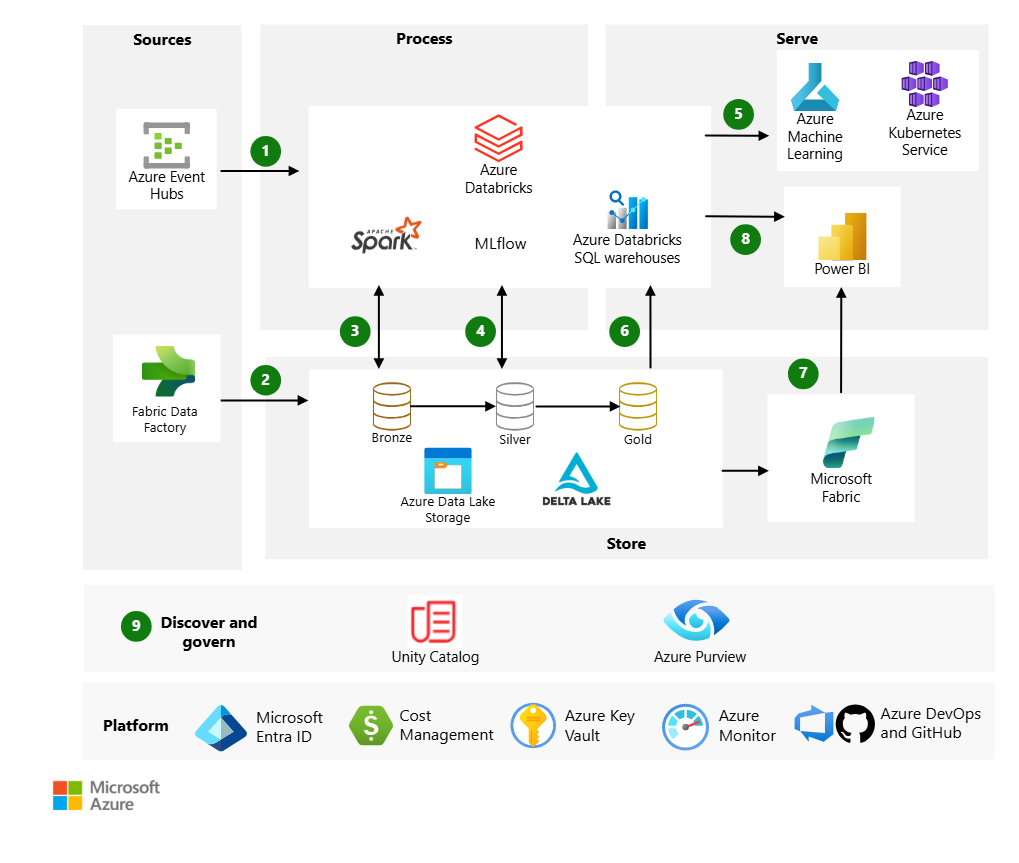
Azure Databricks is a first-party Azure service jointly developed by Databricks and Microsoft. It is fully integrated into the Azure ecosystem.
Azure Service Integration Map
| Category | Azure Service | Role |
|---|---|---|
| Storage | Azure Data Lake Storage Gen2 (ADLS) | Primary object storage for the lakehouse |
| Batch Ingestion | Azure Data Factory / Fabric Data Factory | Orchestrate batch data pipelines into ADLS |
| Streaming Ingestion | Azure Event Hubs / IoT Hub | Real-time event and IoT data ingestion |
| Identity & Access | Microsoft Entra ID (Azure AD) + SCIM | SSO, user provisioning, identity management |
| Secrets | Azure Key Vault | Store and manage secrets, keys, certificates |
| Governance | Microsoft Purview | Enterprise-wide data discovery, classification, lineage |
| BI & Reporting | Power BI | Dashboards and reporting via optimized Databricks connector |
| Monitoring | Azure Monitor | Telemetry, health monitoring, diagnostics |
| CI/CD | Azure DevOps / GitHub | Version control, deployment automation |
| Cost Management | Microsoft Cost Management | Track and optimize Databricks spend |
| Networking | Azure VNet, Private Link, NSGs | Secure network isolation for classic workspaces |
| Source Systems | Azure SQL DB, Cosmos DB, Synapse | Source data via Lakehouse Federation or ETL |
| AI Services | Azure OpenAI | GenAI integration via Mosaic AI |
Data Flow (Reference Architecture)
Key Azure-Specific Points for Interviews
- Azure Databricks workspaces are deployed as an Azure resource in your subscription
- Classic workspaces use your Azure VNet and ADLS storage account
- Serverless workspaces use Databricks-managed default storage
- Unity Catalog can export schema and lineage info to Microsoft Purview
- Power BI connects via optimized Databricks SQL connector or Direct Lake mode via Fabric
- Private Link secures access between Databricks and Azure storage/services
Workspace Architecture
Databricks operates out of a control plane and a compute plane.
- The control plane includes the backend services that Databricks manages in your Databricks account. The control plane is located in the Databricks account, not your cloud account. The web application is in the control plane.
- The compute plane is where your data is processed. There are two types of compute planes depending on which compute you are using:
- For serverless compute, the resources run in a serverless compute plane within your Databricks account.
- For classic compute, the resources are in your cloud account, called the classic compute plane. This refers to the network in your cloud account and its resources.
Same as the compute, workspaces also are of two types
- Serverless workspaces: A workspace deployment in your Databricks account that comes pre-configured with serverless compute and default storage to provide a completely serverless experience. You can still connect to your cloud storage from serverless workspaces.
- Classic workspaces: A workspace deployment in your Databricks account that provisions storage and compute resources in your existing cloud account. Serverless compute is still available in classic workspaces.
When to choose serverless workspace
Serverless workspace are best choice when:
- Enabling business users to access genie.
- Creating AI/BI Dashboards
- Creating databricks apps
- Performing exploratory analytics using notebooks or SQL warehouses
- Connecting to SaaS providers through Lakehouse federation (but not lakehouse connect)
- Creating serverless Lakeflow Spark Declarative Pipelines
When to choose classic workspaces
Classic workspaces are the best choice for the following use cases:
- Porting existing legacy Spark code that uses Spark RDDs
- Using Scala or R as your primary coding language
- Streaming data that requires time-based trigger intervals
- Connecting to on-premises systems or private databases directly, through Lakeflow Connect